
Or: How I Went From Building AI Systems for Clients to Building AI Infrastructure for Myself
I'd just wrapped up my AI Engineer stint at Crayon'd in December 2025. months of building agentic AI systems for multinational clients, deploying production grade LLM pipelines, and designing self-hosted AI infrastructure. The kind of work where you're orchestrating multi-agent systems with tools, memory, and coordination.
Then I took a break. Started ricing my Mac again. Tweaking LLM architectures. The usual student dev downtime activities.
That's when YouTube's algorithm struck. One video about self hosting. One click. Three months later, I'm running a full production homelab on a mini PC I've named "Mini Pekka".
The Accidental Discovery
December 2025. Fresh off building AI infrastructure for enterprise clients. I was perfectly content optimizing my terminal configs, finetuning LLMs, benchmarking inference performance across hardware platforms, and contributing to Apple's ML Stable Diffusion repo and Google Deepmind's Torax repo.
Then the algorithm showed me a homelab video.
"Huh, that's neat," I thought. "I could probably do that."
Me rn: I did do that. I did way too much of that.
The Stack: A Visual Tour
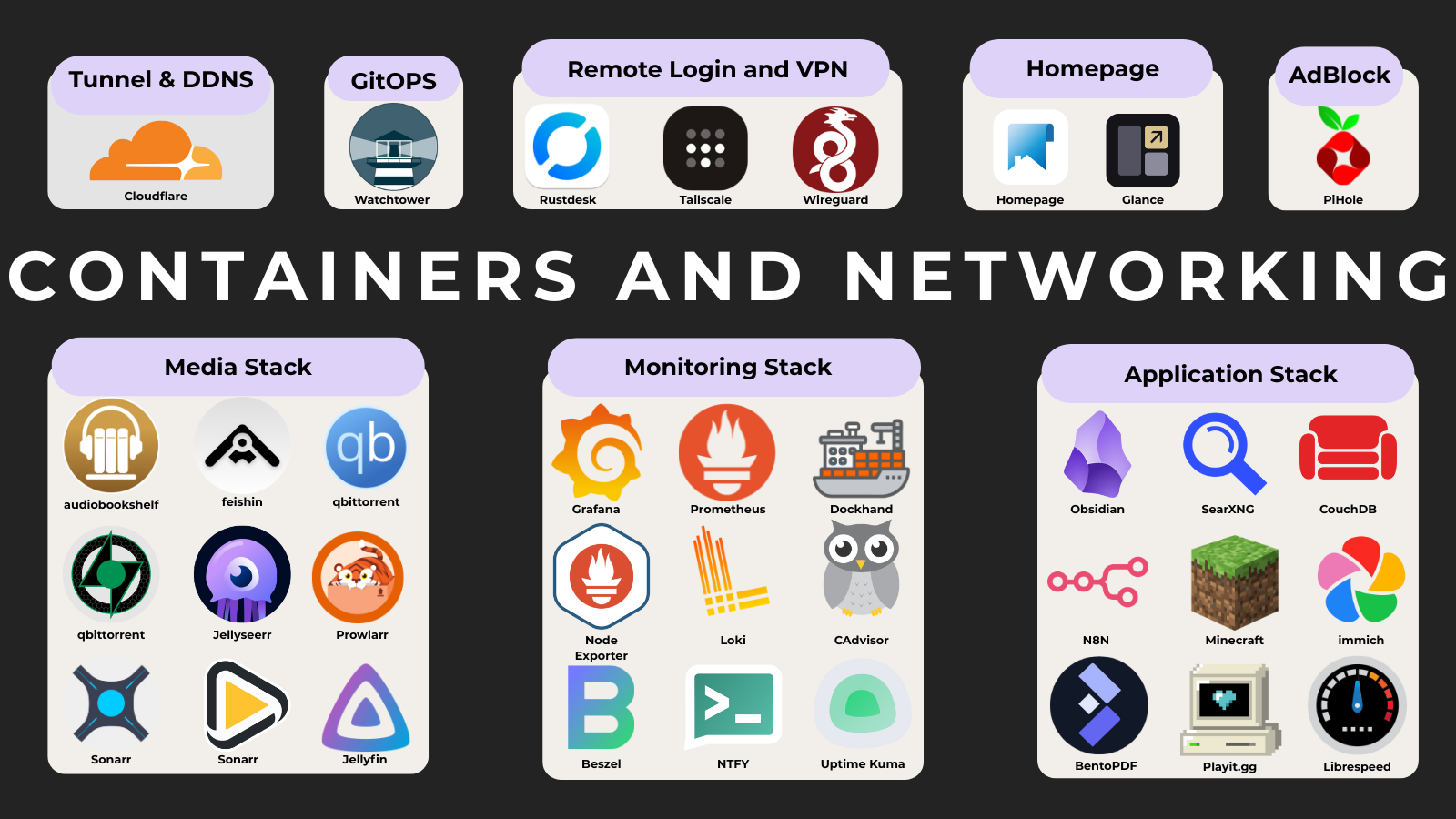
Media Stack (The Gateway Drug)
The arr stack became my introduction to the interconnected beauty of self hosted services. Everything orchestrated through a custom WARP network. Because privacy matters, even when you're just downloading Linux ISOs.
First, I request content on Jellyseerr. Then Sonarr / Radarr / Lidarr take over metadata and monitoring. Prowlarr finds the sources, and qBittorrent (via WARP) downloads them and when Prawling if a Cloudflare reverse proxy cum captcha comes in between Flaresolverr automatically solves it. Finally, Jellyfin, Feishin, or Audiobookshelf serve the content. Profit.
Full Flow
- Request movies & TV on Jellyseerr
- Sonarr (TV), Radarr (Movies), Lidarr (Music) fetch metadata & track releases
- Prowlarr aggregates indexers and finds sources
- qBittorrent downloads the content through a SOCKS5 Proxy (WARP)
- Media is organized automatically into the library without hardlinks
- Consumption layer:
- Jellyfin → Movies & TV
- Feishin → Music (via Jellyfin music backend)
- Audiobookshelf → Audiobooks & podcasts
- ???
- Profit 💸
Check out the full arr stack: arr/docker-compose.yml
Monitoring Everything
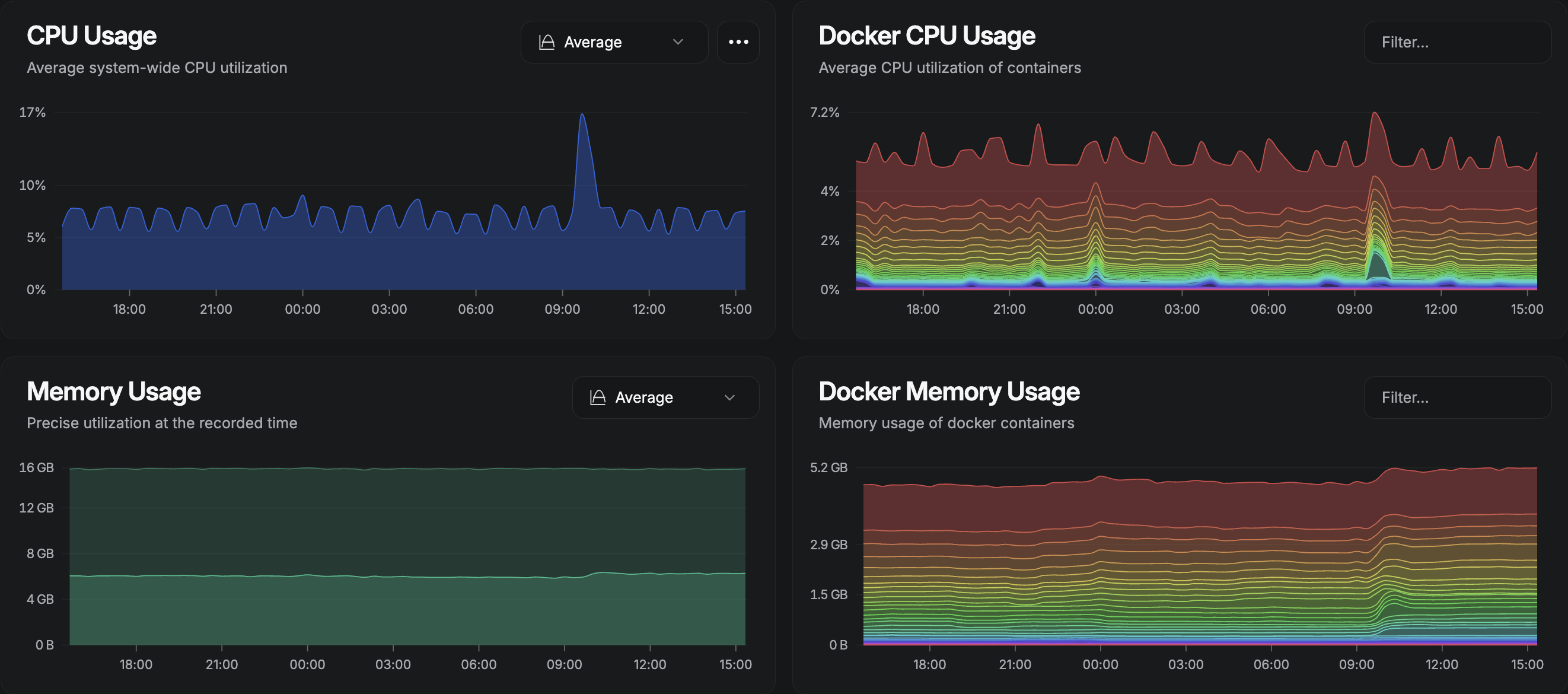
Because if you can't graph it, does it even exist?
I'm running Beszel for lightweight system monitoring because running full LOKI Stack for a homelab is overkill... or is it? Uptime Kuma serves as my 3 AM "your service is down" notification system. Then there's LOKI stack with Prometheus, grafana, node exporter and cAdvisor for metrics I'll probably never look at but feel good having. I dont wanna explain the entire KT between the applications in LOKI stack, everything is configured in the config yaml files, hence kindly refer the repo.The stack also pushes notifications when a resources are being over used via N8N discord bot and ntfy.
Watchtower is the gitOPS tool which handles auto updates. But to be honnest im planning on moving from Watchtower to renovate but still gotta rnd more for the shift.
Automation & Productivity
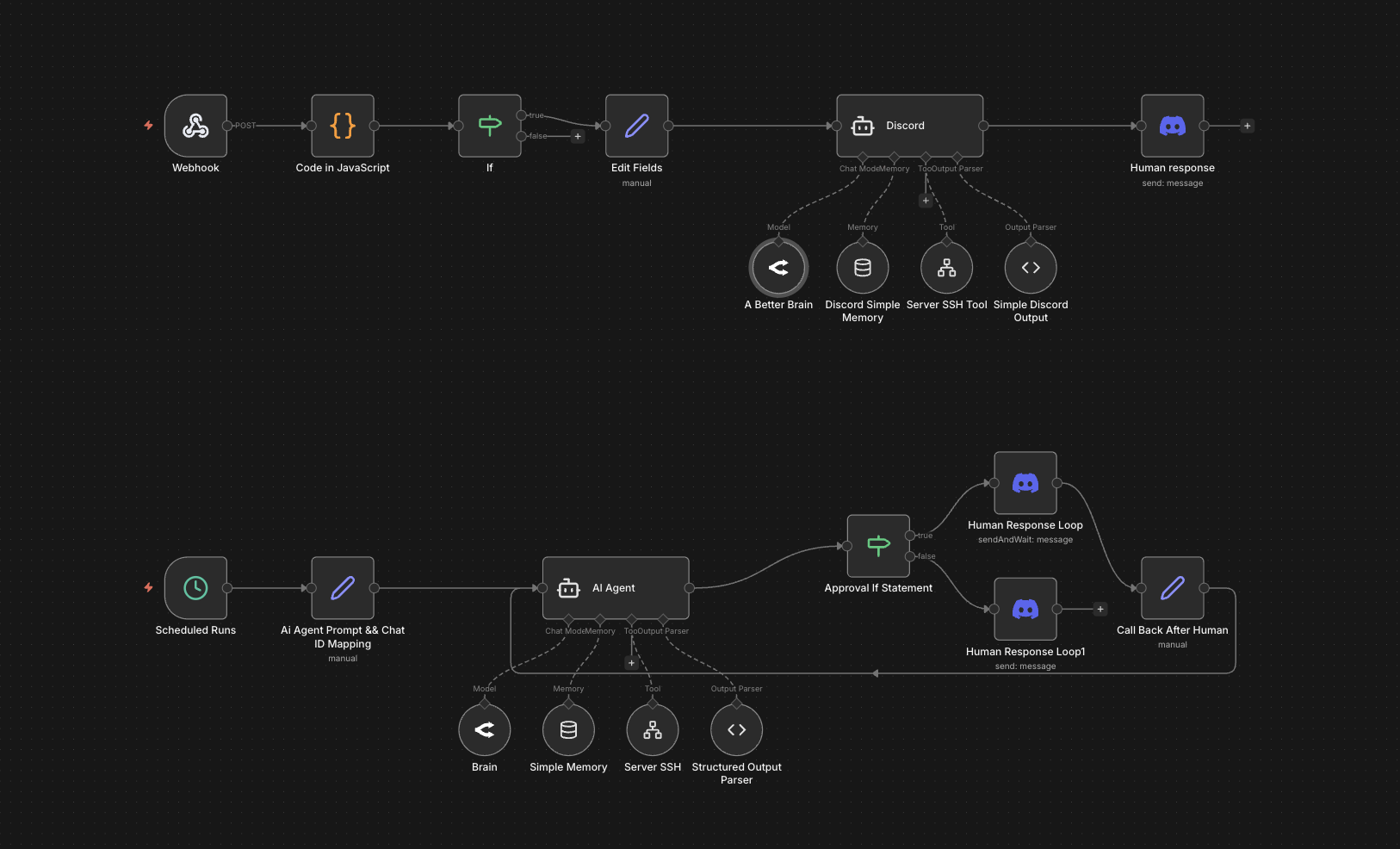
N8N handles my workflow automation. Think IFTTT but you actually own it. Ntfy sends push notifications to my phone.
N8N runs workflows that send notifications through Ntfy when downloads complete, monitor service health ands alert me, automatically organize media files, trigger backups on schedule, and probably do things I've forgotten about.
This is also a discord bot which has SSH Access To The Server and can remotely run bash script and give tldrs of what is happening in the server.
Homepage
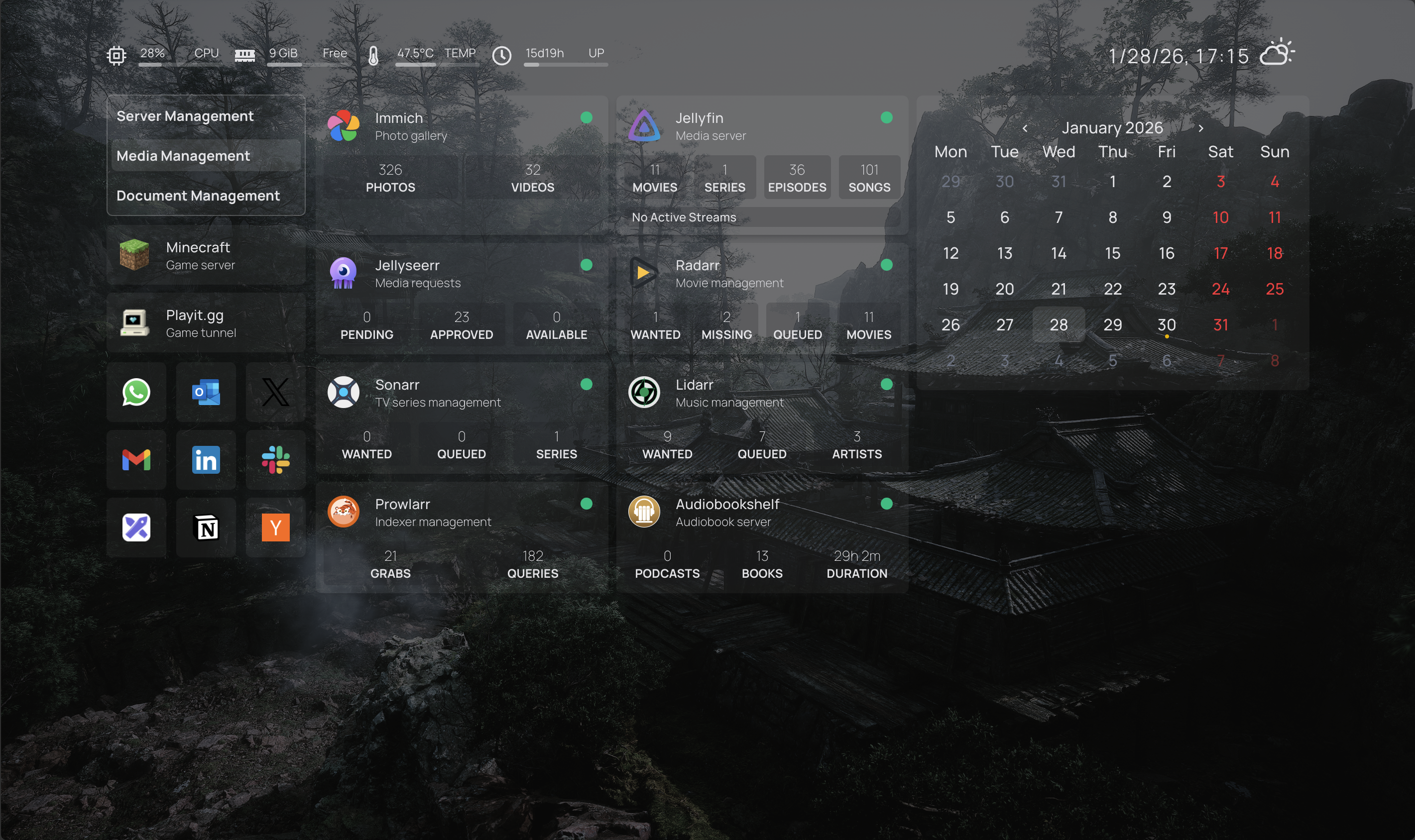
Homepage serves as my custom dashboard where CSS crimes were committed.
Network & Access
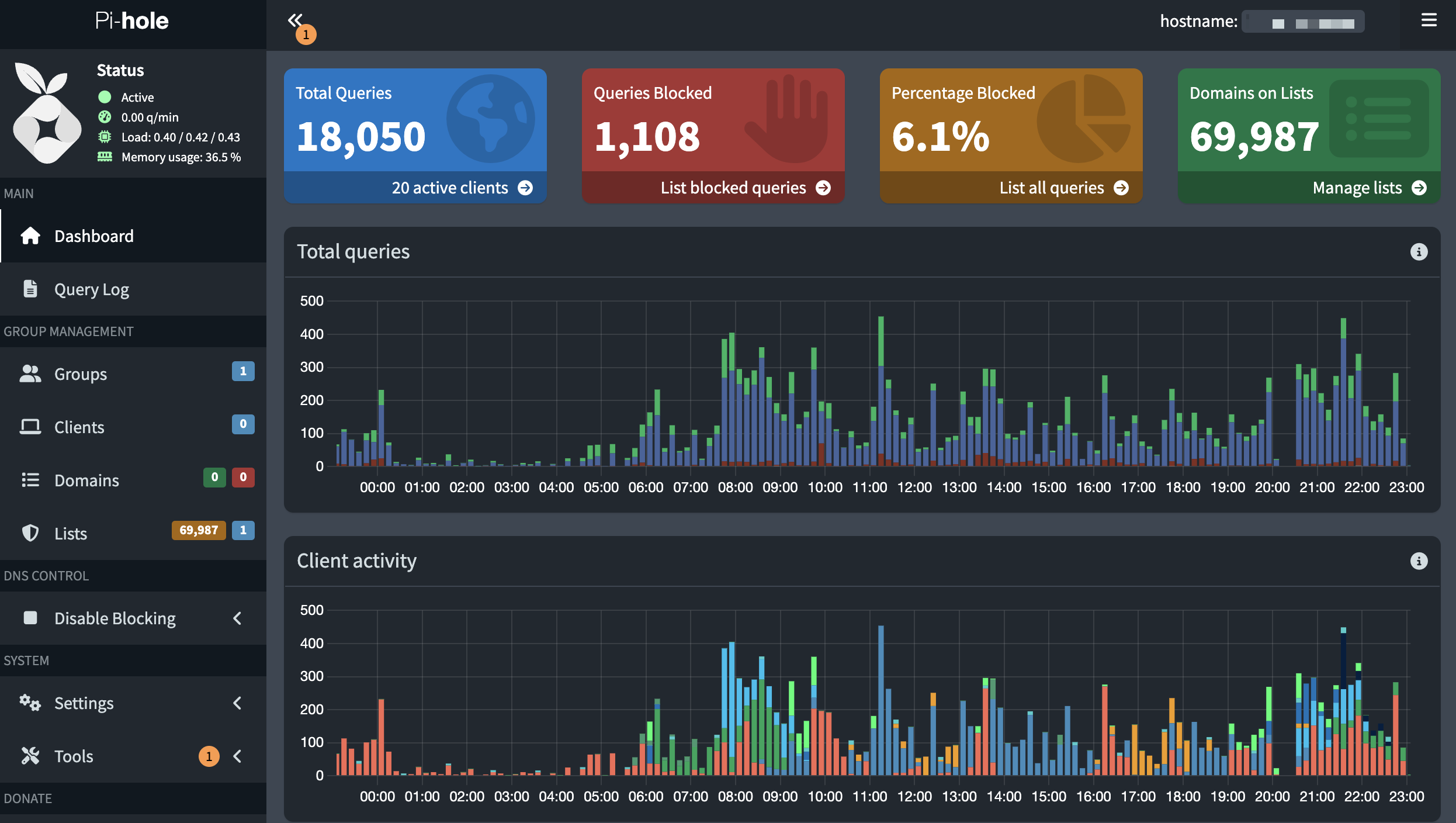
Pihole blocks ads network wide and has a very cool ui for admin stats, logs and overall a very feature rich ux. Cloudflare DDNS handles dynamic DNS because my ISP rotates my ISPs IPs. And this is the best currated network stack for selfhosters without a public ip in my opinion.
Cloudflare Tunnel lets me expose services without opening ports. WireGuard via wg-easy provides VPN access for when I'm not home, setting up this was PAINFUL. When I was setting up, I never knew about forwarding UDP ports in CGNAT. After alot of iterations and rnd, I got to know about playit.gg and used its free UDP port to map the localport. Still There is very poor porting and it gets randomly blocked with requests CNAME Domain But IT WORKS FOR NOW.
Everything Else
minecraft was the first container that i ran on the homelab and here is the very commit on the repo. In the first few weeks on January I moved to auto-mcs but due to more unwanted RAM and CPU usage, I rollbacked to the good'ol itzg's containers.
Immich serves as my self hosted Google Photos replacement. Immitch also provides crazy Hardware Transcoding, you just have to have NVIDIA Container Toolkit.The defualt config comes with redis and its caches in the root dir and asscessed over the baremetal from NVMe. It’s especially useful when traveling, allowing you to share access with others and automatically back up everything.
SearXNG provides private search engine and metasearch and aggregates results from multiple search providers, this is very nice for data mineing, research, and OSINT workflows. They also retur
BentoPDF handles PDF manipulation without uploading to sketchy sites or any sites. This has a currated list of all the usefull PDF Tools.
Dockhand gives me a web UI for managing containers at college's wifi where tailscale is blocked and if the fix is very crutial then i will have to switch to either rustdesk or ssh with tailscale over my mobile hostspot, which is very slow in my college
RustDesk offers self hosted remote desktop like anydesk but faster with rust and secure as its you guessed it self hosted.
Speedtest Tracker its basically a simple web application simillar to speed testing website and there is also a cool way telemetry data and look it back. I know for a matter of fact that i will never use it but still, why not have another sqllite screaming with read and writes with the most random telemetry.
Full service list: github.com/kushvinth/containers
Things I Learned (The Hard Way)
1. Docker Networking is a Rabbit Hole
At first I thought Docker networking was simple. After needing containers to talk to each other, I discovered bridge networks. After needing VPN routing, some containers needed custom networks. After needing Cloudflare Tunnel, I couldn't figure out why my hairpin NAT wasn't working.
Now I have custom bridge networks which bypass and serve UDP traffic via CGNAT with playit.gg (But I would not recommend doing this, if you really want to server UDP Traffic just get a cheap vps). Some services use host networking. There's a WARP container that others route through. Services that can only talk to specific other services. A mental map of which container can reach what. It works.
2. Port Mapping is an Form of Art
I now have a mental map of every port. I can't remember birthdays, but I know 9696 is Prowlarr.
3. Monitoring and Notifications
When the arr stack on my server on the initial dry run with my family members, my yougest cousin was watching interstellar on 4k HDR (which was a 100gb file) and parallely i and my mom where using Feishin (music). The server was very slow (not a crash) but all the services where running very slowly, and after 3hrs of interstellar the server was very exhausted. After this tragic incident, I Added ntfy and gaurdrails to the monitoring stack and now, I will get notifications when the resources are being exhausted in the server. Now I check my Grafana dashboard more than social media.
The Hardware: Mini Pekka
Running 40+ containers on a single mini PC taught me more than any course could. It's running an Intel i5-7200U with 4 cores, 32GB RAM, 512GB NVMe, and a 4TB External HDD.
I learned that proper resource limits matter. The choice between restart: always and restart: unless-stopped is a real decision. Some containers lie about memory usage. Hardware transcoding requires /dev/dri access. SSDs make everything faster (shocking, I know).
# Resource limits are non-negotiable
deploy:
  resources:
    limits:
      cpus: '0.5'
      memory: 512M
    reservations:
      cpus: '0.25'
      memory: 256M
The name Mini Pekka? Clash Royale players know. Small, efficient, 4 Elixir card, occasionally gets overwhelmed but keeps going.
Integration Hell (Heaven?)
The beauty and curse of self hosting: everything can and must talk to everything.
It starts with a simple request on Jellyseerr, I want to watch something. That request flows to Sonarr (for TV), Radarr (for movies), or Lidarr (for music), which immediately reach out to Prowlarr to search across all configured indexers. When Prowlarr finds what we need, it passes the torrent to qBittorrent, which routes all traffic through the WARP container which is a SOCKS5 Proxy for privacy. As downloads complete, the media gets organized into the appropriate library folder where Jellyfin picks it up for streaming, Feishin handles the music, and Audiobookshelf manages audiobooks.
But the communication doesn't stop there. Uptime Kuma constantly pings every service to check if it's alive and i use it when i just wanna see the uptime of all the services as a whole without pinging every public facing endpoint, which feeds status data to my Homepage dashboard. Prometheus scrapes metrics from cAdvisor, Node Exporter, and individual services, storing everything for Grafana to visualize. When something interesting happens a download completes, a service goes down, or disk usage spikes N8N triggers workflows (this health check runs every 5 minutes) that send push notifications through Ntfy and discord bot to my phone. Beszel watches system resources in real time, while Watchtower quietly checks for container updates every night at 4 AM like a CRON.
The networking layer ties it all together: Cloudflare Tunnel exposes select services to the internet without opening ports, WireGuard provides secure VPN access when I'm away and tailscale is blocked, and Pihole sits at the DNS level blocking ads for everything. Cloudflare DDNS keeps my domain pointed at the right IP as my ISP rotates addresses. Flaresolverr handles Cloudflare challenges and automatically solves the captchaso Prowlarr can actually scrape indexers. Valkey (Redis) caches data for SearXNG and Immich, making searches and photo loading instant. Bazarr watches Sonarr and Radarr's libraries, automatically downloading subtitles for anything missing them.
Each integration represents another API key in .env, another service dependency, another potential failure point, and another thing that breaks. But when it works? Chef's kiss 🤌
The ML Connection
Remember how I mentioned I was an AI Engineer? Building agentic systems and production LLM pipelines?
Turns out homelabs and AI infrastructure have a lot in common:
| Past Work | Homelab Equivalent |
|---|---|
| Self hosted AI infrastructure | Self hosted everything |
| Production grade LLM pipelines | Production grade service stack |
| Multi agent coordination | Multi container orchestration |
| Tool integration | Service integration |
| Memory management | Storage management |
| Monitoring AI systems | Monitoring all systems |
The homelab became my personal AI testbed.
Current ML/AI Use Cases:
I'm running local LLM inference with Ollama soon™. Testing edge AI deployment strategies. Benchmarking model performance on different hardware. Hosting AI-powered automation through N8N. Experimenting with on-device ML (remember DosAI?).
From my past work experiences:
Designed deployment frameworks leveraging complementary format strengths, utilizing MLX for low latency interactive tasks and GGUF for broad hardware compatibility
Translation: I'm was testing that research on Mini Pekka. The homelab isn't just containers it's a live environment for my edge AI research.
The Learning Experience
My AI/ML background helped:
My experience with Docker from containerizing ML models proved invaluable. Environment variables made sense from running ML experiments. Resource management came naturally since GPU memory is expensive. I understood monitoring through tools like TensorBoard which translates to Grafana. API design knowledge from model serving carried over to service APIs.
Homelabbing taught me new things:
I learned about reverse proxies like Caddy and Nginx. Network security with VPNs, tunnels, and firewalls became second nature. Service discovery using Docker labels and DNS was new territory. Backup strategies following the 3-2-1 rule matter. Infrastructure as Code with everything in Git is now standard practice. The importance of documentation became clear as future me is grateful.
Timeline:
Oct 2025: "I'll just set up one service"
Dec 2025: Finished at Crayon'd
Jan 2026: 40+ services running
Jan 2026: Writing this blog
Current Status & Architecture
I'm now running 40+ services across 45+ containers since some services need multiple. Uptime sits at 99.98% where that 0.02% was my ISPs fault (DUCKING BSNL BRO). My sleep schedule is destroyed and I have no regrets.
Architecture Overview:
Internet
    ↓
Cloudflare Tunnel / WireGuard
    ↓
Reverse Proxy (Caddy/Nginx)
    ↓
Docker Bridge Networks
    ↓
Services (with resource limits)
    ↓
Monitoring (Prometheus/Grafana)
    ↓
Notifications (Ntfy)
    ↓
sysadmin (me)
Full architecture: github.com/kushvinth/containers
The Philosophy
Every service you self host is one less subscription. That's $10/month times 10 services equals $1200/year saved. One less company with your data. One more thing you control. One more thing that can break.
My Current Self Hosted Alternatives:
iCloud Photos→ ImmichZapier→ N8NPlex→ JellyfinAudible→ AudiobookshelfGoogle Search→ SearXNGSurfSharkVPN→ Tailscale Exit NodesTeamViewer→ RustDeskFirebase Push→ NtfySpeedtest.net→ Speedtest Tracker
Is it more work? Yes. Is it worth it? Also yes. Would I recommend it? Absolutely. Would I help you set it up? Check my consulting page and we can talk.
What's Next?
Immediate Roadmap:
I plan to migrate to Proxmox for a proper hypervisor. Add a NAS to eliminate bind mounts everywhere. Implement automated backups using restic or borg. Test disaster recovery because that's important. Add another node for high availability. Deploy Ollama for local LLM inference. Launch more AI/ML services.
Long Term Dreams:
GitOps with ArgoCD is on the list. A proper CI/CD pipeline would be nice. Infrastructure testing needs to happen. Maybe a rack? Definitely more containers.
The roadmap never ends. That's the whole point.
For the Curious: Getting Started
If you're thinking "I could do that," here's how:
Step 1: Pick One Service
Start with something useful. Jellyfin if you have media. Immich if you have photos. N8N if you like automation. Homepage if you want a dashboard.
Step 2: Learn Docker
# It's really just this
docker compose up -d
docker compose logs -f
docker compose down

# or just use lazydocker
alias ld=lazydocker
ld
Step 3: Add Monitoring
Because you need to know when things break:
cd uptimekuma
docker compose up -d
Step 4: Watch It Grow
Before you know it, you'll have 10+ services running.
Resources:
Check out My Homelab Repo, Awesome Selfhosted, r/selfhosted, and r/homelab.
Hardware Recommendations:
For a mini PC, the Intel i5-7200U is what I use. Get 32GB RAM minimum. Storage should be 512GB NVMe plus an external HDD. Budget $150-200 for everything.
Warning Signs You're Too Deep:
You're checking your monitoring dashboard before social media. You're debugging at 2 AM. You think "one more container won't hurt." You're explaining to friends why you "need" to self-host. You have backups of your backups. You're reading homelab blogs at 3 AM like this one.
The Reality Check
Homelabbing is:
Setting things up at after midnight because sleep is optional. Spending 3 hours fixing something that takes 5 minutes on cloud. Checking Grafana more than Instagram. Explaining to non tech friends why you selfhost everything. Having more backups than a paranoid sysadmin. Still not testing disaster recovery. Proudly showing your dashboard to people who don't care.
But also:
Learning more than any course could teach. Having complete control over your data. Saving money on subscriptions eventually. Building real infrastructure skills. Having a live testbed for ML/AI work. Joining an amazing community. Never being bored.
Would I recommend it? Yes. Is it for everyone? No. Am I too deep to get out? Absolutely. Do I regret it? Not even a little.
Connect & Contribute

Want to build your own homelab?
Check out my containers, fork the repos, ask questions. The homelab community is incredibly helpful. Just be prepared: it's a one way door. Once you start self hosting, there's no going back.
Check out the configs at github.com/kushvinth/containers
P.S. Yes, I spent more time on the Homepage CSS than I'd like to admit. Yes, I have a monitoring dashboard for my monitoring dashboard. Yes, I check Uptime Kuma before checking messages. Yes, my .gitignore is 130+ lines. Because I just wanted to store the compose files and thier configs. Everything is fine.
P.P.S. The repository is public. Judge my docker compose organisation at your leisure. PRs are welcome.